Melbourne’s Trusted Experts in Automated Gates & Fencing – Residential, Commercial & Industrial Solutions.

How To Troubleshoot An Automatic Gate That Doesn't Fully Close
Automatic gate not closing fully? Learn the common causes, troubleshooting steps, maintenance tips, and when to call a technician for repairs.
6/17/20268 min read
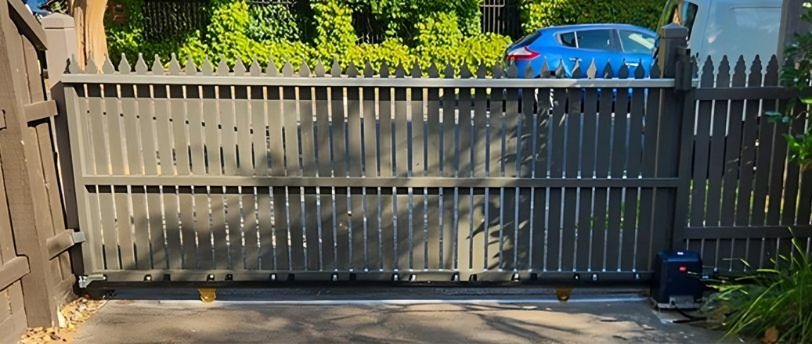
A gate that stops halfway is more than an annoyance. If it's not closing fully, the property isn't secured. Anyone or anything can still get through. And depending on where you are in Melbourne, that's not something you want to leave unattended for long.
Before you call a technician, there are several things worth checking yourself. A lot of the time the fault comes down to something you can see, clean, or adjust. Dirt in the track, a sensor that's shifted slightly on its bracket, a limit switch that hasn't been calibrated in years. This guide covers the most common causes of an automatic gate not closing fully and what to check for each one.
Common Reasons a Gate Won't Fully Close
Several different faults can stop a gate before it reaches the closed position. Some are mechanical, some are electrical, and some are a combination.
Here are the most likely causes:
Debris or an obstruction in the track or gate path
Safety sensors that are dirty, misaligned, or blocked
Limit switch settings that have drifted or been wiped
A motor that's overheating or under load
Worn rollers, damaged hinges, or a bent track
A power supply issue or low battery voltage
A "hold open" command left active in the control board
A loose or stretched drive chain on sliding gates
It's worth checking each of these in order. Two or three smaller faults happening at once are more common than people expect, and fixing just one of them won't always resolve the problem.
Quick Symptom Check
Use this table to narrow down where to start.
1. Check for Obstructions in the Track or Path
This is the first place to look. Small things in the wrong spot can stop a heavy gate completely. For sliding gates, walk the full length of the bottom track and look for anything that shouldn't be there. Gravel, packed leaves, dirt built up in a corner, even a small stone can jam the rollers. Clear out the whole track and test the gate again.
For swing gates, check the full arc the gate travels through when closing. Low branches, overgrown garden edges, or something leaning against the fence can physically block the gate or cut the sensor beam. It's not always obvious, particularly if growth has been slow and gradual. Stand near the gate and watch it move through its full travel at slow speed to see where it's catching.
2. Clean and Realign the Safety Sensors
Safety sensors, sometimes called photo eyes, stop the gate if something crosses the path while it's closing. They sit low on the gate posts and send a beam across the opening. If that beam is blocked, dirty, or the sensors have shifted out of alignment, the gate will stop or reverse rather than close.
How to check them:
1. Find both sensor units on the gate posts. Each should have a small indicator light.
2. If the light is off or flashing, the beam isn't connecting properly.
3. Wipe both lenses with a dry, lint-free cloth. Dust, spider webs, and water spots cause this more often than people think.
4. Check that both sensors are pointed directly at each other. A few millimetres off is enough to break the connection.
5. Look at whether either sensor has been knocked, bumped, or has shifted on its bracket.
6. Check the cables going into each sensor for loose connections or visible wear.
7. If direct sunlight is hitting one of the sensors, try shading it and testing again. Some older sensor models struggle in bright light.
If the sensors look aligned and clean but the gate still reverses or stops short, check for anything reflective in the beam path. A parked car or shiny surface at the right angle can confuse older sensor units.
3. Check the Limit Switch Settings
Limit switches tell the motor when to stop moving. There's a setting for the open position and a separate one for the closed position. If the closed limit has shifted, the motor stops the gate before it reaches the end of its travel.
This tends to happen gradually, not all at once. Over months of regular use, small vibrations from the motor can nudge the setting slightly. The gate might have been closing fine, then starts leaving a consistent gap. That same gap at the same spot every time is a strong indicator the closed limit needs adjusting. Most gate motors let you change the travel limits through the control board, either through a programming mode or a set of dedicated buttons. The exact process depends on the brand and model, so check the manual for your system.
If your gate was recently reset or the power was cut for an extended period, the limits may have been wiped and need to be programmed again from scratch. There's a step-by-step guide covering the reprogramming process in our post on how to reset your automatic gate.
4. Check the Motor for Overheating or Strain
Gate motors have a built-in thermal overload that cuts power to the motor when it gets too hot. The gate moves partway, the motor shuts off, and it won't respond again until it cools down. This protects the motor from damage, but it also means something is putting more load on the system than there should be.
Signs the motor might be the issue:
The gate tries to close but stops and reverses without any visible obstruction
The motor sounds louder or more strained than it used to
The motor housing is warm after just one or two cycles
The gate closes fine in cooler weather but struggles through summer
There's a grinding or clicking sound during operation
If the motor is cutting out regularly, the motor itself may not be the root cause. Stiff rollers, a tight drive chain, or a worn hinge all put extra load on the motor and cause it to overheat faster than it should. Check those components too.
5. Inspect Rollers, Hinges, and the Track
Physical wear on the gate's moving parts is one of the more common causes of a gate that won't close fully, and one that often gets overlooked until it becomes obvious.
For sliding gates, disconnect the motor and try pushing the gate by hand. It should roll with minimal effort. If it drags, catches, or feels stiff at any point, look for a bent section of track, a seized roller, or debris jammed in a wheel. Rollers flatten and crack over time. A gate that moved freely two years ago may now be fighting against worn-out wheels on every cycle.
For swing gates, check the hinges. A gate that sags at the latch end will have trouble making full contact with the stop or latch when closing. Try lifting the free end slightly while it closes. If it shuts properly with a bit of support, the hinge is the problem. Lubricating hinges every six months helps slow the wear, but hinges that are loose, corroded, or worn through will need tightening or replacing before the gate closes reliably again.
6. Test the Power Supply
Gate motors need consistent voltage to complete their full travel. If the voltage drops mid-cycle, the motor may not have enough power to push the gate all the way to the closed position. This fault is easy to miss because the gate appears to be running, just not finishing.
Things to check:
Check the circuit breaker for the gate and reset it if it's tripped
Look for loose connections at the control box and motor terminals
If the system uses a solar panel or battery backup, test the battery with a voltmeter. Batteries over two years old often can't hold enough charge to run the motor through its full cycle
If your system uses a stepdown transformer, check it's putting out the right voltage for your motor
Inspect the wiring along the gate posts for sections that may have been damaged by weather, pests, or garden work
A motor running on insufficient voltage will often get the gate 80 to 90 percent of the way closed before it loses the drive to push further. It's an easy fault to fix once it's identified.
7. Check for an Active "Hold Open" Command
Some gate systems have a hold open function that keeps the gate in the open position until the command is cancelled. If this was activated by accident through a keypad or remote, the gate will keep trying to stay open even when you send a close command.
Check the control board and any keypads for active timed or held open settings. It's a quick thing to rule out and easy to miss if you're not familiar with all the features on your system. Your manual will show where this setting is in the menu.
When to Stop and Call a Technician
Several of these checks are straightforward to do yourself. Others are best left to someone with the right tools and training. Call a technician if:
You can hear grinding, scraping, or unusual clicking from inside the motor housing
The control board is showing error codes that aren't covered in your manual
There's a burning smell from the motor or control box
The motor is running but the gate isn't moving at all
Wiring inside the control box looks damaged, burnt, or melted
The gate has come off its track or a hinge is visibly bent or broken
You've checked everything in this guide and the fault is still there
Working around electrical components inside a gate motor carries real risk. If something looks wrong and you're not sure what it is, electric gate repairs from someone who works on these systems regularly is the right call.
Basic Maintenance That Prevents Most of These Problems
Most of the faults covered in this guide are less likely to happen with regular maintenance. Gates that get consistent attention tend to have fewer unplanned faults and last considerably longer.
The exact frequency of maintenance depends on usage and environmental factors, but understanding how often gate automation systems should be serviced helps prevent unexpected mechanical failures and extends the equipment's lifespan.
When a Small Fix Isn't Enough
Some faults are quick to sort out. A sensor wipe, a limit adjustment, or clearing rubbish from the track and the gate's back to normal. Other times, the gate not closing properly is a sign of wear or damage that's been getting worse over a period of time and needs a proper look.
If you've checked everything in this guide and the gate is still stopping short, or the same fault keeps coming back every few weeks, the system likely needs a hands-on inspection. Some faults only show up when someone can physically test the components and check what's happening inside the motor housing.
iGate Automation services the entire Melbourne area, delivering expert gate repairs ranging from technical sensor fixes to full motor replacements. To book a service call or discuss pricing for your system, reach out via our contact page or speak with our team directly on 1300 251 900.
Frequently Asked Questions
1. Why does my automatic gate stop halfway and reverse back open?
This is typically caused by a blocked or misaligned safety sensor beam. Check for dirt on the lenses, obstructions, or reflective surfaces in the path. Alternatively, it may trigger if the motor overloads and reverses for safety.
2. My gate closes most of the way but always leaves a small gap. What's causing it?
A consistent gap usually means the closed limit switch needs adjusting. Motor vibrations can cause this setting to shift over time, stopping the gate early. You can typically recalibrate this through the control board's programming mode
3. Can Melbourne's weather affect whether my gate closes properly?
Yes. Extreme summer heat expands metal components, increasing friction, while freezing winter mornings stiffen track lubricants. Over time, heavy rain also causes rust and corrosion on crucial hinges, rollers, and tracks, leading to operational drag.
4. Is it safe to adjust the limit switches on my gate myself?
Adjusting digital travel limits via the control board is generally safe if you follow the manual. However, avoid opening the motor housing or altering internal mechanical components, as incorrect settings can easily compromise vital system safety functions.
5. How do I know if my gate motor needs replacing rather than just repairing?
Frequent overheating, grinding noises, or running without moving the gate indicate severe internal wear. If your system requires constant repairs or is over a decade old, replacing the motor is generally more cost-effective than fixing it.
Address : 22 Barkly St, Brunswick East VIC 3057, Australia
Connect With Us On Social Media
I Gate Automation
ABN 25 634 531 231
Our Privacy Policy
Our Terms & Conditions
Contacts
1300 251 900
info@igateautomation.com.au